About FieldX Mobile
FieldX Mobile is used by Crop Consultants and Agronomists to record scouting observations and recommended actions. Features include: - Create customized Scouting and Recommendation forms for quick data entry. - Enter data...
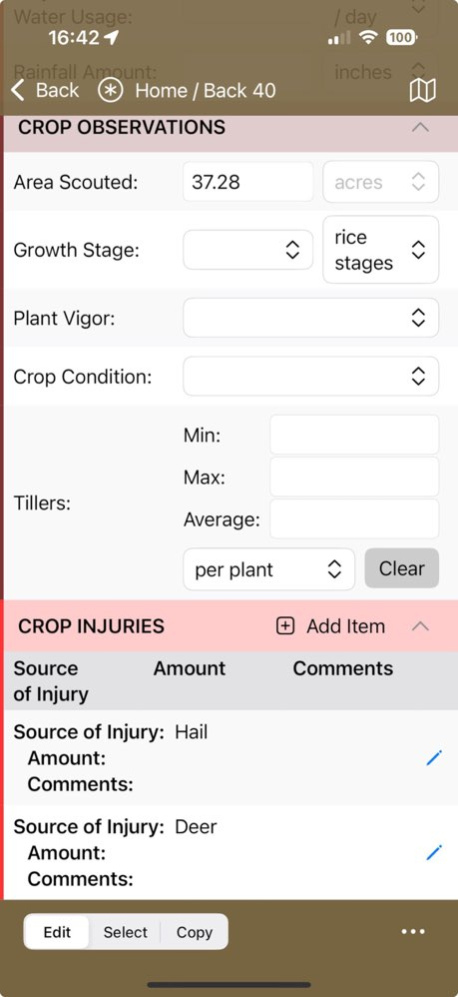
FieldX Mobile is used by Crop Consultants and Agronomists to record scouting observations and recommended actions. Features include: - Create customized Scouting and Recommendation forms for quick data entry. - Enter data for multiple fields at the same time. - Copy and paste data from one data entry form to another. - View and edit historical entries. - Email PDF reports to the Grower or Applicator. - Run offline; no internet connection is required for data entry. This app is for existing FieldX customers. If you are not a customer, contact us to start a free trial.
Version History Resolved issue with displaying certain min/max/average properties in scouting records 1.10.6 Jul 8 Bug fix 1.10.5 Jun 23 Reduce size of saved sketches. Fix issue with menu options in journal editor sidebar on iPhone. Fixed issues with text tool in sketch editor. 1.10.4 Jun 10 Fixed issue with stalled initial sync 1.10.3 Jun 5 Fixed issue where sync/upload was blocked by open journal entries, despite no open entries in the editor. Fixed issue where the journal editor form UI locks up after dismissing a popup numeric keypad. Other minor fixes. 1.10.2 Jun 3 Fixed issue with saving application rate values 1.10.1 May 20 Major user interface updates - tabbed interface to more easily navigate the program - same grower tree everywhere (selecting a field on the map is now reflected in the history) - bigger and more intuitive buttons for new journal entries and reports - number of selected fields and acres - single-click 'Done' button for journal entries Bug fixes - seeing extraneous templates - duplicate borders in certain situations - issues with logging out and back in - various minor issues 1.10.0 May 18 Added support for limited grower accounts 1.9.2 Apr 6 Bug Fixes. 1.9.1 Jan 27 - Added support for creating and editing other journal entry types, including Planting, Apply Treatment, FieldPlan, etc. - Fixed bug with dropdown lists closing immediately after they're opened. - Added new option in settings to select whether the map shows all fields, only selected fields, or only filtered fields. - When deleting a sketch, leave sketch window open so can make a new sketch. - Added ability to search/filter picklists, such as chemicals. - Added option to specify which sections are automatically opened on a journal entry form, instead of all collapsed. - Display a warning if the chemical rate is outside the range of min/max values. - Added an option on Recommendation Output Report to 'include all recs in timeframe'. - Miscellaneous bug fixes and user-interface improvements. 1.9.0 Jan 25 Fixed issue where Area value was being copied during batch copy. 1.7.1 09/11/2025 - Color fields by crop (crop colors are specified in FieldX Dashboard). - Filter the grower tree by crop. - Group the open journal entries by crop. - Populate Chemical and Fertilizer cost in Recommendation entries. - Memorized comments are now supported. 1.7.0 08/05/2025 Fixed: if a template has required data fields, then require something to be entered before allowing it to be saved. Fixed: allow Insects, Weeds, Diseases, and Chemical to be removed after applying a template, or after adding an item. Tapping a field border on the map will now zoom to that field. Added the ability to rename the output PDF report filename. Various user interface enhancements. 1.6.0 07/09/2025 1. 'Use Most Recent Entry' as a template is now available when opening multiple new journal entries. 2. Get directions to the field has been added. 3. The map will now zoom to the fields that are selected in the grower tree. 4. Added the ability to delete journal entries that are Pending Upload. 5. Optionally, when tap 'Save' on a new scouting entry, automatically set the Finish time to the current time. 6. Fixed various minor bugs. 1.5.0 06/21/2025 - SCOUT: Sketch has been added to the Scouting Entry form. - RECOMMENDATION: When adding a chemical, fertilizer, or manure to a Recommendation, the default rate is automatically populated on the form. 1.4.0 06/12/2025 - Show the GPA on the Recommendation editor page. - Create Scout or Recommendation entries for fields associated with the current open Journal entries. - Apply a template after a Journal entry is opened. - Attach the output Report PDF to an email, instead of just including the link. - Prompt the user to confirm deletion when select 'Discard and Close' journal entry. - Fixed various bugs. 1.3.0 06/05/2025 - Added an option to unselect the selected fields when a scout or recommendation entry is created. - Fixed an issue with the popup list of Treatment Categories being too small. - Require a sync prior to generating an output PDF report when there are pending journal entries. - Sort picklists alphabetically. - Fixed GUID sync errors. 1.2.4 05/20/2025 - Automatically include Recommendation Target Date. - Fill entire window when previewing an Output Report. - Austomatically select the last used Output Report Template. - Sort entries by date in the Field History view. - Remove Journal Entry Templates that were deleted. - Don't show growers/farms/fields that were set inactive. - Update growers/farms/fields that are renamed. - Handle changes to a user's grower access. - Fixed bug with moving fields to different farm. - Various bug fixes. 1.2.3 05/13/2025 Fixed issue: when selecting weeds and insects, nothing happens. Fixed issue: the Grower tree isn't refreshed after a farm or field is moved. 1.2.2 05/01/2025 Fixes to refreshes of On Device and Pending lists in Journal History view. 1.2.1 04/24/2025 Several user interface enhancements. Various bug fixes. 1.2.0 04/22/2025 - Fixed issue with using Most Recent Scouting Entry as a template. - Fixed issue with picklist sorting (growth stages, etc). - Minor user-interface changes. - Add the ability to expand/collapse all sections of the form in one tap. 1.1.0 03/12/2025 1.0.0 02/25/2025
Previous Versions
Here you can find the changelog of FieldX Mobile since it was posted on our website on 2026-07-09 20:24:46.
The latest version is 1.10.6 and it was updated on 2026-10-07 02:14:29. See below the changes in each version.
FieldX Mobile version 1.10.6
Updated At: 2026-10-07
Changes: Version History Resolved issue with displaying certain min/max/average properties in scouting records 1.10.6 Jul 8 Bug fix 1.10.5 Jun 23 Reduce size of saved sketches.
Fix issue with menu options in journal editor sidebar on iPhone.
Fixed issues with text tool in sketch editor. 1.10.4 Jun 10 Fixed issue with stalled initial sync 1.10.3 Jun 5 Fixed issue where sync/upload was blocked by open journal entries, despite no open entries in the editor.
Fixed issue where the journal editor form UI locks up after dismissing a popup numeric keypad.
Other minor fixes. 1.10.2 Jun 3 Fixed issue with saving application rate values 1.10.1 May 20 Major user interface updates
- tabbed interface to more easily navigate the program
- same grower tree everywhere (selecting a field on the map is now reflected in the history)
- bigger and more intuitive buttons for new journal entries and reports
- number of selected fields and acres
- single-click 'Done' button for journal entries
Bug fixes
- seeing extraneous templates
- duplicate borders in certain situations
- issues with logging out and back in
- various minor issues 1.10.0 May 18 Added support for limited grower accounts 1.9.2 Apr 6 Bug Fixes. 1.9.1 Jan 27 - Added support for creating and editing other journal entry types, including Planting, Apply Treatment, FieldPlan, etc.
- Fixed bug with dropdown lists closing immediately after they're opened.
- Added new option in settings to select whether the map shows all fields, only selected fields, or only filtered fields.
- When deleting a sketch, leave sketch window open so can make a new sketch.
- Added ability to search/filter picklists, such as chemicals.
- Added option to specify which sections are automatically opened on a journal entry form, instead of all collapsed.
- Display a warning if the chemical rate is outside the range of min/max values.
- Added an option on Recommendation Output Report to 'include all recs in timeframe'.
- Miscellaneous bug fixes and user-interface improvements. 1.9.0 Jan 25 Fixed issue where Area value was being copied during batch copy. 1.7.1 09/11/2025 - Color fields by crop (crop colors are specified in FieldX Dashboard).
- Filter the grower tree by crop.
- Group the open journal entries by crop.
- Populate Chemical and Fertilizer cost in Recommendation entries.
- Memorized comments are now supported. 1.7.0 08/05/2025 Fixed: if a template has required data fields, then require something to be entered before allowing it to be saved.
Fixed: allow Insects, Weeds, Diseases, and Chemical to be removed after applying a template, or after adding an item.
Tapping a field border on the map will now zoom to that field.
Added the ability to rename the output PDF report filename.
Various user interface enhancements. 1.6.0 07/09/2025 1. 'Use Most Recent Entry' as a template is now available when opening multiple new journal entries.
2. Get directions to the field has been added.
3. The map will now zoom to the fields that are selected in the grower tree.
4. Added the ability to delete journal entries that are Pending Upload.
5. Optionally, when tap 'Save' on a new scouting entry, automatically set the Finish time to the current time.
6. Fixed various minor bugs. 1.5.0 06/21/2025 - SCOUT: Sketch has been added to the Scouting Entry form.
- RECOMMENDATION: When adding a chemical, fertilizer, or manure to a Recommendation, the default rate is automatically populated on the form. 1.4.0 06/12/2025 - Show the GPA on the Recommendation editor page.
- Create Scout or Recommendation entries for fields associated with the current open Journal entries.
- Apply a template after a Journal entry is opened.
- Attach the output Report PDF to an email, instead of just including the link.
- Prompt the user to confirm deletion when select 'Discard and Close' journal entry.
- Fixed various bugs. 1.3.0 06/05/2025 - Added an option to unselect the selected fields when a scout or recommendation entry is created.
- Fixed an issue with the popup list of Treatment Categories being too small.
- Require a sync prior to generating an output PDF report when there are pending journal entries.
- Sort picklists alphabetically.
- Fixed GUID sync errors. 1.2.4 05/20/2025 - Automatically include Recommendation Target Date.
- Fill entire window when previewing an Output Report.
- Austomatically select the last used Output Report Template.
- Sort entries by date in the Field History view.
- Remove Journal Entry Templates that were deleted.
- Don't show growers/farms/fields that were set inactive.
- Update growers/farms/fields that are renamed.
- Handle changes to a user's grower access.
- Fixed bug with moving fields to different farm.
- Various bug fixes. 1.2.3 05/13/2025 Fixed issue: when selecting weeds and insects, nothing happens.
Fixed issue: the Grower tree isn't refreshed after a farm or field is moved. 1.2.2 05/01/2025 Fixes to refreshes of On Device and Pending lists in Journal History view. 1.2.1 04/24/2025 Several user interface enhancements.
Various bug fixes. 1.2.0 04/22/2025 - Fixed issue with using Most Recent Scouting Entry as a template.
- Fixed issue with picklist sorting (growth stages, etc).
- Minor user-interface changes.
- Add the ability to expand/collapse all sections of the form in one tap. 1.1.0 03/12/2025 1.0.0 02/25/2025
FieldX Mobile version 1.10.5
Updated At: 2026-07-08
Changes: Version History Bug fix 1.10.5 Jun 23 Reduce size of saved sketches.
Fix issue with menu options in journal editor sidebar on iPhone.
Fixed issues with text tool in sketch editor. 1.10.4 Jun 10 Fixed issue with stalled initial sync 1.10.3 Jun 5 Fixed issue where sync/upload was blocked by open journal entries, despite no open entries in the editor.
Fixed issue where the journal editor form UI locks up after dismissing a popup numeric keypad.
Other minor fixes. 1.10.2 Jun 3 Fixed issue with saving application rate values 1.10.1 May 20 Major user interface updates
- tabbed interface to more easily navigate the program
- same grower tree everywhere (selecting a field on the map is now reflected in the history)
- bigger and more intuitive buttons for new journal entries and reports
- number of selected fields and acres
- single-click 'Done' button for journal entries
Bug fixes
- seeing extraneous templates
- duplicate borders in certain situations
- issues with logging out and back in
- various minor issues 1.10.0 May 18 Added support for limited grower accounts 1.9.2 Apr 6 Bug Fixes. 1.9.1 Jan 27 - Added support for creating and editing other journal entry types, including Planting, Apply Treatment, FieldPlan, etc.
- Fixed bug with dropdown lists closing immediately after they're opened.
- Added new option in settings to select whether the map shows all fields, only selected fields, or only filtered fields.
- When deleting a sketch, leave sketch window open so can make a new sketch.
- Added ability to search/filter picklists, such as chemicals.
- Added option to specify which sections are automatically opened on a journal entry form, instead of all collapsed.
- Display a warning if the chemical rate is outside the range of min/max values.
- Added an option on Recommendation Output Report to 'include all recs in timeframe'.
- Miscellaneous bug fixes and user-interface improvements. 1.9.0 Jan 25 Fixed issue where Area value was being copied during batch copy. 1.7.1 09/11/2025 - Color fields by crop (crop colors are specified in FieldX Dashboard).
- Filter the grower tree by crop.
- Group the open journal entries by crop.
- Populate Chemical and Fertilizer cost in Recommendation entries.
- Memorized comments are now supported. 1.7.0 08/05/2025 Fixed: if a template has required data fields, then require something to be entered before allowing it to be saved.
Fixed: allow Insects, Weeds, Diseases, and Chemical to be removed after applying a template, or after adding an item.
Tapping a field border on the map will now zoom to that field.
Added the ability to rename the output PDF report filename.
Various user interface enhancements. 1.6.0 07/09/2025 1. 'Use Most Recent Entry' as a template is now available when opening multiple new journal entries.
2. Get directions to the field has been added.
3. The map will now zoom to the fields that are selected in the grower tree.
4. Added the ability to delete journal entries that are Pending Upload.
5. Optionally, when tap 'Save' on a new scouting entry, automatically set the Finish time to the current time.
6. Fixed various minor bugs. 1.5.0 06/21/2025 - SCOUT: Sketch has been added to the Scouting Entry form.
- RECOMMENDATION: When adding a chemical, fertilizer, or manure to a Recommendation, the default rate is automatically populated on the form. 1.4.0 06/12/2025 - Show the GPA on the Recommendation editor page.
- Create Scout or Recommendation entries for fields associated with the current open Journal entries.
- Apply a template after a Journal entry is opened.
- Attach the output Report PDF to an email, instead of just including the link.
- Prompt the user to confirm deletion when select 'Discard and Close' journal entry.
- Fixed various bugs. 1.3.0 06/05/2025 - Added an option to unselect the selected fields when a scout or recommendation entry is created.
- Fixed an issue with the popup list of Treatment Categories being too small.
- Require a sync prior to generating an output PDF report when there are pending journal entries.
- Sort picklists alphabetically.
- Fixed GUID sync errors. 1.2.4 05/20/2025 - Automatically include Recommendation Target Date.
- Fill entire window when previewing an Output Report.
- Austomatically select the last used Output Report Template.
- Sort entries by date in the Field History view.
- Remove Journal Entry Templates that were deleted.
- Don't show growers/farms/fields that were set inactive.
- Update growers/farms/fields that are renamed.
- Handle changes to a user's grower access.
- Fixed bug with moving fields to different farm.
- Various bug fixes. 1.2.3 05/13/2025 Fixed issue: when selecting weeds and insects, nothing happens.
Fixed issue: the Grower tree isn't refreshed after a farm or field is moved. 1.2.2 05/01/2025 Fixes to refreshes of On Device and Pending lists in Journal History view. 1.2.1 04/24/2025 Several user interface enhancements.
Various bug fixes. 1.2.0 04/22/2025 - Fixed issue with using Most Recent Scouting Entry as a template.
- Fixed issue with picklist sorting (growth stages, etc).
- Minor user-interface changes.
- Add the ability to expand/collapse all sections of the form in one tap. 1.1.0 03/12/2025 1.0.0 02/25/2025
Disclaimer
Official App Store Link
We do not host FieldX Mobile on our servers. We did not scan it for viruses, adware, spyware or other type of malware. This app is hosted by Apple and passed their terms and conditions to be listed there. We recommend caution when installing it.
The App Store link for FieldX Mobile is provided to you by apps112.com without any warranties, representations or guarantees of any kind, so access it at your own risk.
If you have questions regarding this particular app contact the publisher directly. For questions about the functionalities of apps112.com contact us.